 KIRA
KIRAFake Launches
Fake Launches creates repeated test tokens from one configured campaign and keeps every result in one history.
Set up the campaign
Choose the source wallet, supported launchpad, token inputs, number of launches, and cadence. Fake Launches uses the same current launchpad support as Projects on the active chain.
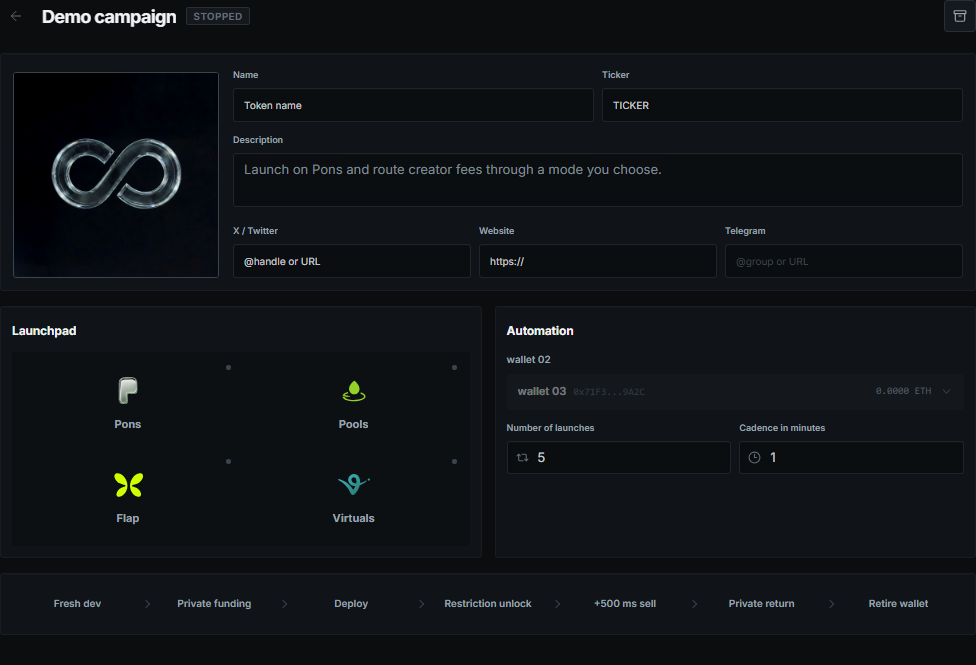
The source wallet stays selectable elsewhere, but Kira will not let two active operations spend the same reserved balance at the same time.
Run and stop
Each cycle receives a new mint or contract address. The activity view shows the token, transaction, and result for every attempt instead of treating repeated dev actions as one bundle.

Cancel stops future launches. It cannot undo a token or transaction that already reached the chain. If submission has an unknown result, Kira checks its known transaction before another candidate can start.
Funding
Funding is part of the campaign setup. Once the source and amount are ready, the campaign begins from the configured state without requiring a second manual start. A failed funding step remains visible and does not silently continue with an unfunded wallet.